DevSecOps · CI/CD pipelines
CI/CD pipelines where every check is a gate with an owner
We design and build pipelines that run the cheapest checks first and stop at the first failure. Each failed gate opens a ticket for the team that owns it, and production receives the image that passed every gate before it.
The problem
Where this usually breaks down
Security findings arrive after release
Scans run nightly or before an audit, so results land when the code has already shipped. By then a fix means a new release, and waiving the finding is easier.
Failures that belong to nobody
A red pipeline emails everyone, so everyone assumes someone else will look. Dependency, quality and image findings each need different judgement, and without routing they sit unread.
Expensive stages run on broken code
When the image build runs before the unit tests, runner time goes on changes that were never going to pass. Developers also wait longer for a simple answer.
What we do
What we set up, and how each part works
We work in your repositories and through your change process, so everything we set up can be reviewed, run and changed by your engineers after we leave.
Gates ordered by cost
Unit tests run first, then software composition analysis, static analysis and the SonarQube quality gate, then the image build and image scan. A change that fails early never consumes a build or a registry push.
Each failed gate reaches its owner
A failed gate opens a Jira ticket in the owning team’s queue and posts to its Microsoft Teams channel. Development owns test failures, QA owns quality gates and security owns scan results, so every finding has one owner.
Branch rules that decide what runs
Merge requests run the fast gates, while changes on the develop, release and hotfix branches also trigger the SIT and UAT pipelines. A developer lead approves each merge, and releases are tagged on main.
Approvals before UAT and production
UAT waits for a QA approval, then runs automation, performance and dynamic security tests. Production needs sign-off from the developer lead, the QA lead and security, and receives the tested image retagged, not rebuilt.
Pipelines defined beside the code
Pipeline definitions live in the repository they build, in Jenkins, GitLab or Azure Pipelines, so a change to a gate is reviewed like any other change. Shared steps sit in a library that teams version and reuse.
Infrastructure changes through the same path
Terraform changes run through a pipeline too, with the plan attached to the merge request and the apply performed by the pipeline identity. The same review rules then cover the application and what it runs on.
Reference architecture
The architecture as it was delivered
Figures from published engagements, reproduced unchanged. Open any figure full size, or read the write-up it comes from.
- Read the write-up: Security gates inside every pipeline, not after them
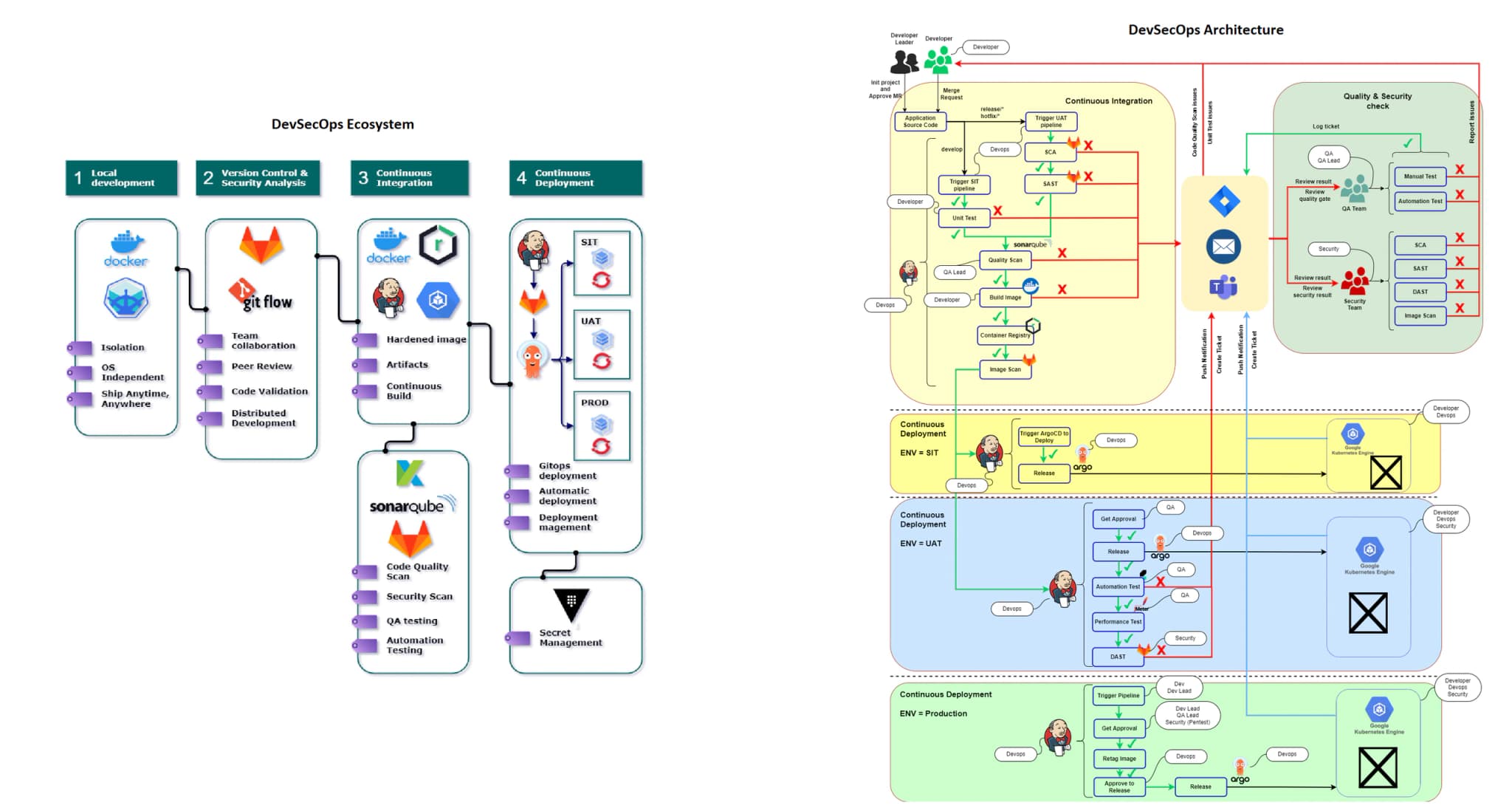
Figure 1 — End-to-end pipeline: every stage is a gate, and a failed check becomes a ticket for the owning team rather than a report at the end.
Open full-size image: Figure 1 — End-to-end pipeline: every stage is a gate, and a failed check becomes a ticket for the owning team rather than a report at the end.
What you keep
What stays with your team when we finish
Everything is committed to your repositories or written into your documentation, under your access controls. Nothing depends on us to keep running.
Pipeline definitions and a shared library
The CI and CD definitions in your repositories, and a versioned library of shared steps, so a new service starts with every gate already in place.
A gate register
Every gate with its purpose, its threshold, the team that owns its result and the people who may approve a documented exception.
Routing for failed gates
The Jira projects, ticket templates and Microsoft Teams channels each gate reports to, set up and tested with the teams who will receive them.
Runbooks for the pipeline
How to add a service, change a gate, handle a flaky test, rotate pipeline credentials and recover a stuck release.
How we work
How an engagement runs, phase by phase
Each phase ends with something your team reviews and signs off before the next one starts. We work inside your change control, not around it.
01
Map how code ships today
We follow a change from merge request to production and record each check, who runs it and when its result is read. Checks that happen outside the pipeline go on the list too.
02
Give every gate an owner
With your development, QA and security leads we decide which checks run on each merge request, which run before UAT and which gate production, and who owns each result.
03
Build it for one service
We build the full pipeline for one real service, including failure routing, and run it alongside the existing process. Thresholds are tuned there, so the gates block real problems rather than noise.
04
Roll out and hand over
Other services adopt the shared library in batches, with your engineers making the changes. They keep the definitions, the gate register and the runbooks, and change a gate through the same review as code.
Technology
The tools this work runs on
Each group says whether a tool appears in our published work, so you can tell what we have shown from what we offer.
Run in production
- GitLab
- Jenkins
- Azure Pipelines
- SonarQube
- Argo CD
- Jira
- Microsoft Teams
- Terraform
Offered, not in published work
- GitHub Actions
Evidence
Published work behind this service
Each statement below points to a write-up you can read in full, with the architecture and the stack as they were delivered.
For a DevSecOps platform, we built Jenkins gates in cost order, from unit tests through SCA, SAST and SonarQube to an image scan, each raising a Jira ticket on failure.
For a bank’s Azure landing zone, we prepared Terraform templates in Azure Repos and set up the process that deploys them through pipelines in Azure DevOps.
Questions
What teams ask before we start
We already use GitHub Actions. Do we have to switch?
No. The gates, their order and the routing of failures matter more than the CI server. We build them in GitHub Actions, GitLab, Jenkins or Azure Pipelines, and keep the runners and permissions your teams already rely on.
Which scanners do you use for SCA, SAST and image scanning?
We start with the tools you already license where they cover the gate, and propose others only where there is a gap. What matters is that each tool runs inside the pipeline, fails the build at agreed thresholds and reports to the right owner.
What if a gate blocks a release we need to ship?
The gate register names who may approve an exception for each gate, and the exception is recorded against the release with its reason. The finding stays open as a ticket, so the waiver is visible rather than forgotten.
Will the extra gates slow our developers down?
The cheap checks run first and answer in the merge request, so most failures surface early. Slower tests such as DAST and performance runs happen in UAT against a deployed build, not on every commit.
Who maintains the pipelines after handover?
Your engineers. The pipeline definitions and shared library live in your repositories, changes to them go through merge requests like any other code, and the gate register says who approves what. We can review changes when you want a second opinion.
Related services
What teams often need alongside this
Security gates inside the pipeline
SCA, SAST, image scanning, DAST and a penetration test placed as pipeline gates, each result owned by development, QA or security.
Cloud-native DevOps on Kubernetes
One image built per change, Helm charts per service, and a GitOps controller that promotes it from SIT to UAT to PROD on Kubernetes.
Infrastructure as code with Terraform
Terraform modules, a plan reviewed on every merge request, applies only from the pipeline, and drift reported before it becomes an incident.
Next step
Plan your pipeline gates with us
Tell us which checks run today, where they run and who reads the results. We will suggest the gate order and the owners to start with.